How to Open a FANR Account in the UAE: Step-by-Step Registration Guide (2026)

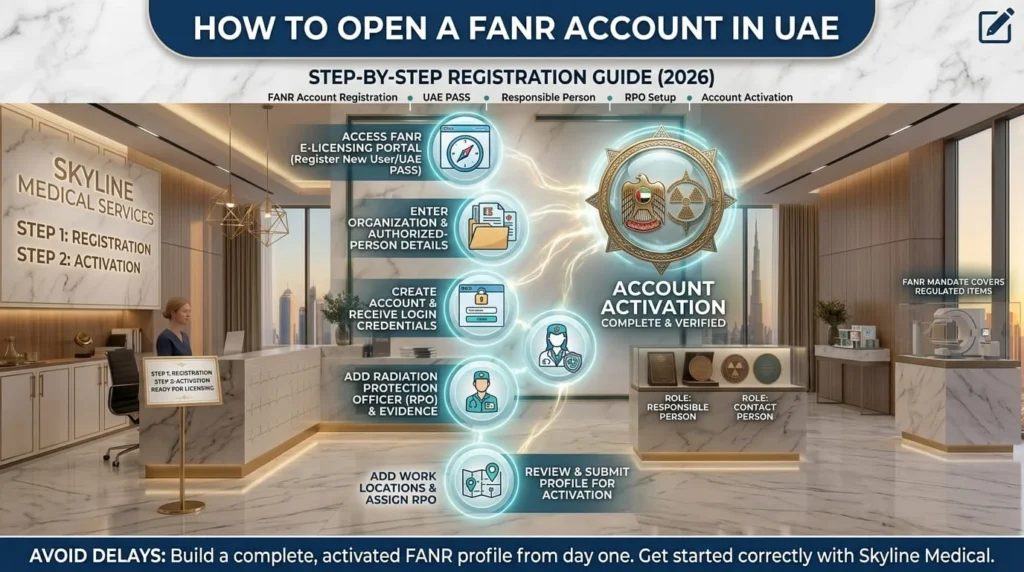
Step-by-step registration infographic guide explaining How to open a fanar account in the UAE for medical facilities.

Table of Contents

More Posts

Send Us A Message

Share:

A FANR account can look like a simple portal registration - until one incorrect company detail, the wrong account role, or an incomplete work-location record holds up everything that comes next.

For UAE dental clinics, medical facilities, radiology providers, and businesses dealing with radiation generators or regulated materials, learning how to open a FANR account correctly is the first practical step toward using the Federal Authority for Nuclear Regulation (FANR) e-Services.

Opening a FANR account involves registering the organization in FANR e-Licensing, assigning the Responsible Person and Contact Person, adding the Radiation Protection Officer (RPO), recording work locations, linking the RPO to those locations, and submitting the profile for account activation.

This guide explains that process in the order a UAE applicant needs it - without confusing account registration with the separate FANR license application.

Opening or expanding a healthcare facility in the UAE?

Start with Skyline Medical’s Clinic & Hospital Licensing Services so the FANR account setup supports the wider approval journey from the beginning.

Explore Licensing Services

FANR Account: Step-by-Step Registration Guide (2026)

 To open a FANR account in the UAE, create the organization profile in FANR e-Licensing, complete the required account roles, add the RPO and work locations, and submit the complete profile to FANR for activation.

FANR requires users to register before they can apply for its e-Services. 

The registration stage creates the digital profile that will later support licensing, inspection, inventory, and other regulatory functions.

 For a clinic or medical business, accuracy at this stage matters because the people and locations entered in the account must reflect the real organization and operating site.

The process can be followed through six practical steps:

  • Access the official FANR e-Licensing portal
  • Enter organization details and authorized-person information
  • Create the FANR account and receive login credentials
  • Add the Radiation Protection Officer (RPO)
  • Add work locations and assign the appropriate RPO
  • Review the profile and submit it to FANR for activation

Step 1: Access the FANR e-Licensing Portal - Start Your Registration the Right Way

Begin on the official FANR e-Licensing portal and select the option to register a new user or establishment.

FANR instructs new applicants to access the e-Licensing system, choose “Register Here,” and accept the Terms & Conditions before entering registration information.

Use the official FANR e-Licensing system rather than a third-party form.

 FANR also publishes UAE PASS sign-in/sign-up instructions for new and existing establishments, so follow the authentication option currently shown by the official portal.

Step 2: Enter Your Organization Details - Get Your Business Information Right the First Time

Enter the organization information exactly as it appears in the supporting corporate or health-authority records.

For private companies, FANR’s current guide identifies the trade license and proof of Chamber of Commerce membership or a health-authority license among the organization documents used during registration.

 The same registration page also captures the Responsible Person and Contact Person.

Keep legal names, license details, and identification data consistent across the profile to reduce avoidable verification issues.

Want the FANR profile to align with the broader clinic compliance file?

Coordinate the licensing plan with Skyline Medical before the application becomes more complex.

Start Your Licensing Plan

Step 3: Add the Responsible Person & Contact Person - Assign the Right People Before You Submit

 Assign a Responsible Person with the required legal authority and a Contact Person who is authorized to communicate with FANR about the application.

FANR states that, for private companies, the Responsible Person must be the owner or legal partner unless another individual is assigned through a Power of Attorney. 

The Contact Person should be familiar with the FANR license application and authorized by the Responsible Person to liaise with FANR and provide authoritative information. 

Choose roles based on real authority and working knowledge, not convenience.

Step 4: Create Your FANR Account - Secure Your Login Before Completing the Profile

Once the mandatory registration fields and uploads are complete, select “Create” to register the account and receive the user ID and password needed to continue.

FANR’s guide says a successful submission generates a registration confirmation and an email containing the login credentials. This is account creation, not FANR approval.

 The organization still needs to complete the RPO and location setup and submit the profile for activation before moving into the license application stage.

Account created?

The next compliance steps should reflect the real facility and project scope. Explore Skyline Medical’s Medical Fit-out & Interior Design services to align space planning with healthcare requirements.

Step 5: Add Your Radiation Protection Officer (RPO) - Complete the Key Compliance Role

 After login, add the Radiation Protection Officer (RPO), complete the required RPO information, and save the record in the FANR profile.

FANR Approval describes the RPO as the person authorized to oversee radiation-protection arrangements associated with regulated material, including radiation generators.

 The registration guide requests supporting evidence for the RPO’s designation, experience, and radiation-safety training. 

FANR also allows more than one RPO to be entered where the organization’s structure requires it.

Planning a healthcare facility that will need radiation-related approvals?

 Explore Skyline Medical’s Clinic & Hospital Licensing Services for coordinated FANR, health-authority, drawing, and compliance support.

Explore Now

Step 6: Review Your FANR Profile - Add Work Locations, Assign RPOs, and Submit for Activation

Before moving to the license application, add the relevant work locations, assign the correct RPO to each location, review the profile, and submit the complete account to FANR for activation.

FANR requires work-location information such as the radiation-source location and the related Responsible Person and Contact Person. 

The system then asks the applicant to assign an RPO to each registered location.

The final account step is “Complete Account Activation: Submit to FANR.”

 FANR states that its Licensing Team verifies the information and activates the account within two working days; activated users can then access applicable licensing, inspection, inventory, and notification functions.

Work locations and equipment plans should tell the same story

See Skyline Medical’s Medical Fit-out & Interior Design services when preparing a clinic site around regulatory and operational needs.

View Skyline Medical Fit-out Services

FANR Account Roles Explained: Responsible Person, Contact Person & RPO

The Responsible Person, Contact Person, and RPO serve different functions in a FANR organization account: authority, communication, and radiation-protection oversight.

These roles should be understood before registration because FANR uses them for different parts of the organization profile and later regulatory workflow.

A correct role structure also helps FANR know who can authorize information, who can answer application questions, and who is responsible for radiation-protection arrangements.

The roles are:

  • Responsible Person - legal/organizational authority for the facility
  • Contact Person - authorized liaison familiar with the FANR application
  • Radiation Protection Officer (RPO) - oversight of radiation-protection arrangements

What Is the Responsible Person in a FANR Account?

The Responsible Person is the organization’s principal authorized individual for FANR registration and must meet FANR’s legal-authority requirements.

For private companies, FANR requires the Responsible Person to be the owner or legal partner unless another person is formally assigned through a Power of Attorney.

 This role should therefore reflect the organization’s actual authority structure rather than being assigned simply to whoever is completing the form.

What Is the FANR Contact Person?

The Contact Person is the authorized liaison who understands the FANR application and can provide reliable information to FANR.

FANR defines this person as someone familiar with the application and authorized by the Responsible Person to liaise with the Authority.

The best Contact Person is therefore someone who can coordinate information and respond accurately throughout the regulatory process.

What Does the Radiation Protection Officer (RPO) Do?

 The RPO oversees the radiation-protection arrangements associated with the organization’s regulated material or radiation generators.

FANR links the role to appropriate education and training in radiation safety and asks for evidence of designation, experience, and training.

The RPO is therefore a substantive compliance role, not simply another contact saved in the portal.

Can the Responsible Person and Contact Person Be Different People?

Yes. FANR treats the Responsible Person and Contact Person as distinct functions, with the Contact Person authorized by the Responsible Person to communicate with FANR.

The exact assignment depends on the organization.

What matters is that the Responsible Person’s authority and the Contact Person’s application knowledge are both clear and accurately reflected in the FANR account.

Roles on the portal are only one part of compliance

The equipment and site must also be supported correctly

Explore Skyline Medical’s Technical Services for installation, maintenance, and technical coordination.

FANR Account Registration vs. FANR License Application: What’s the Difference?

A registered and activated FANR account gives the organization access to FANR e-Licensing services, it does not by itself authorize a regulated activity.

Account registration establishes the organization, account roles, RPOs, and work locations.

The FANR license application is a separate regulatory submission covering the activity the organization wants to conduct and the information required for that activity. 

FANR’s regulated-materials license guide tells new applicants to make sure the account is registered and activated before applying for a new license.

The distinction is simple:

  • Account registration creates and activates the e-Licensing profile
  • License application requests regulatory authorization
  • Account roles and work locations are established first
  • Activity-specific information is submitted in the later application
FANR Account RegistrationFANR License Application
Creates the organization profileRequests regulatory authorization
Sets account roles and locationsDefines the intended regulated activity
Must be activated firstStarts after account activation

Can You Register for a FANR Account with UAE PASS in 2026?

Yes. FANR publishes official guidance for establishments to sign in or sign up to FANR services using UAE PASS, including guidance for new FANR users.

FANR’s UAE PASS manual covers both existing and new users.

Because digital-government workflows can change, use the authentication option currently displayed by FANR rather than relying on an older screenshot or unofficial tutorial.

For a current 2026 registration, verify:

  • The sign-in or sign-up option shown on the official FANR portal
  • Whether the establishment is new or already registered
  • The current UAE PASS prompts and required organization information
  • Any notice or instruction displayed inside FANR e-Licensing
💡

Digital registration is the front door, not the full project.

Contact Skyline Medical
if you need a coordinated path from account setup to clinic readiness.

What Should You Have Ready Before Opening a FANR Account?

Prepare the organization records, Responsible Person and Contact Person information, RPO evidence, work-location details, and digital files needed for the FANR profile before you begin.

FANR’s registration guide sets out different supporting evidence for government entities and private companies and also specifies information for the account roles and RPO. 

Having clean, current documents ready makes it easier to complete the online workflow without stopping to correct basic identity or organization details.

Prepare these categories:

  • Organization and trade-license information
  • Responsible Person identification and authority details
  • Contact Person information
  • RPO designation, experience, and radiation-safety training evidence
  • Work-location information
  • Supporting files in FANR-accepted formats

Setting up the facility and the compliance file together?

Review Skyline Medical’s Authority Requirements solutions so operational purchases and regulatory planning stay aligned.

Explore Authority Requirements

What Happens After Your FANR Account Is Activated?

 After account activation, the organization can use FANR e-Licensing to access the regulatory services relevant to its activity and begin the appropriate application.

FANR states that activated accounts can access applicable functions for applications, inspections, inventory, notifications, and other regulatory records.

 Its Services page includes new licenses, renewals, amendments, registration certificates, import/export permits, and other e-Services. 

The correct next action depends on the organization’s regulated activity and intended use of radiation generators or other regulated material.

After activation, the next stage usually involves:

  • Selecting the FANR service that matches the intended activity
  • Preparing activity-specific information and supporting evidence
  • Submitting the appropriate FANR application
  • Coordinating equipment, site, and radiation-safety requirements where applicable
  • Managing later FANR requests, inspections, inventory, or renewals through the account
🚀

Once the account is active, move from portal setup to a coordinated licensing and technical plan.

Speak with Skyline Medical about clinic licensing support
and the next regulatory steps.

Need Help Moving from FANR Registration to Approval?

Skyline Medical can support UAE healthcare facilities beyond account registration by coordinating licensing, fit-out, technical requirements, and medical equipment planning within the same clinic-setup project.

For a clinic using X-ray or other radiation-generating equipment, the FANR account is only the digital starting point.

 The wider project may also involve regulatory applications, room planning, drawings, shielding-related requirements, installation, quality-control activities, and equipment coordination. 

Skyline’s licensing service specifically includes FANR support for healthcare facilities using X-ray equipment, while its fit-out and technical teams support the physical implementation of the clinic.

Relevant Skyline services include:

  • Clinic and hospital licensing support
  • Medical fit-out and interior design
  • Technical services and equipment support
  • Medical equipment planning and supply
  • Direct regulatory and project consultation

Final Takeaway: Build the FANR Account Correctly Before You Build the Application

A strong FANR licensing journey starts with an accurate, fully activated account: correct organization data, properly assigned roles, documented RPO coverage, and accurate work locations.

The key point is that FANR account activation and FANR license approval are not the same event.

First establish and activate the e-Licensing profile; then use that account to apply for the regulatory authorization relevant to the activity. 

Keeping the digital profile aligned with the real clinic, location, and equipment plan creates a cleaner handoff into licensing and compliance work.

Before moving forward:

  • Use the official FANR portal and current instructions
  • Keep organization and authorized-person information consistent
  • Complete RPO and work-location setup before activation
  • Do not treat account activation as a FANR license
  • Align the FANR profile with the actual facility and equipment plan
Ready to move from FANR account registration into a coordinated UAE clinic approval plan?

Talk to Skyline Medical about licensing, fit-out, technical services, and equipment planning.


Talk to Skyline Medical

The most common FANR account questions concern where to register, who should hold each role, whether an RPO is required, how UAE PASS works, and whether an activated account is already a FANR license.

The answers below give direct guidance for UAE clinics and medical businesses completing FANR account registration.

The FAQs cover:

  • How to open a FANR account in the UAE
  • Where FANR account registration is completed
  • Who should be the Responsible Person
  • Whether an RPO is required during account activation
  • Using UAE PASS with FANR services
  • Whether an activated account is the same as a FANR license

1. How do I open a FANR account in the UAE?

Open the account through official FANR e-Licensing, complete the organization and account-role details, add the RPO and work locations, assign the RPO to those locations, and submit the complete profile to FANR for activation.

2. Where do I register for a FANR account?

Register through FANR’s official e-Licensing services. FANR states that new users must register before applying for its e-Services.

3. Who should be the Responsible Person on a FANR account?

For private companies, FANR states that the Responsible Person should be the owner or legal partner unless another person is formally assigned through a Power of Attorney.

4. Do I need a Radiation Protection Officer to complete FANR registration?

The current account-activation workflow requires RPO information and RPO assignment to registered work locations before the complete profile is submitted for activation.

5. Can I use UAE PASS to access FANR services?

Yes. FANR publishes a dedicated manual for establishments to sign in or sign up using UAE PASS. Follow the option currently shown in the official FANR portal.

6. Does opening a FANR account mean I already have a FANR license?

No. Account activation provides access to e-Licensing functions. A FANR license is a separate regulatory authorization that requires its own application and review.

The Author’s Profile

  • Name: Malik Abu Shamaa

  • Profession: Biomedical Engineer

  • Experience: 7 years 

  • Expertise: Certified KaVo Expert

Equip Your Clinic with Trusted Devices

Recommended Products from Skyline